Citizen Access v1.0.1
Description
Supports Citizens to access their services safely and securely. Also supports Citizens in viewing and updating Patient information online.
The diagram below illustrates the relationship between this standard and the Capabilities mentioned above which make up the Citizen Services (i.e. the requirements within this standard have to be met in order to deliver one or more of the Capabilities listed above).
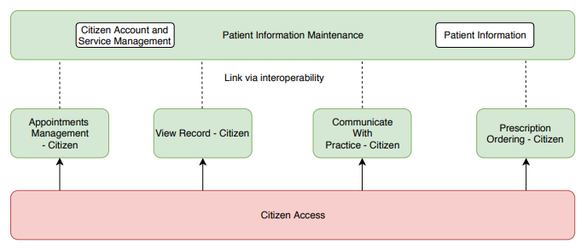
For Citizens to be able to access Citizen Services enabled by the Practice, they will need to undergo Account Linkage to link their Online Service Account (OSA) to their Verified User Account (VUA). This will provide access to their Patient Record, or the Patient Record of the Patient/s they will be accessing the Services for. Once Account Linkage is complete the Online Service Account (OSA) becomes a Linked Online Service Account (LOSA).
Patients can also access limited services by creating their own account (aside from receiving or requesting Citizen Service access via the Practice), at this point have an Online service Account (OSA). Once an account is created the Patient can request to get access to further Services defined by the Practice.
The terms Online Service Account (OSA), Verified User Account (VUA) and Linked Online Service Account (LOSA) are intended to assist Suppliers in the implementation of Capabilities which make up the Citizen Services and it is recommended that they are not displayed on the interface of Solutions.
Structure and Lifecycle of Patient Online Accounts
Previous GPSoC requirements for Patients' online accounts were extremely confusing and difficult to understand. This document is essential reading for Solution providers as it seeks to more clearly articulate the different types of account a Patient can have, how they differ and the processes involved in their creation. There have been some minor changes in terminology intended to address the issue that certain terms (ROSU, OSU) were inappropriately attached to the Citizen, when they in fact described the state of an account.
Patient Account Model
Account Types
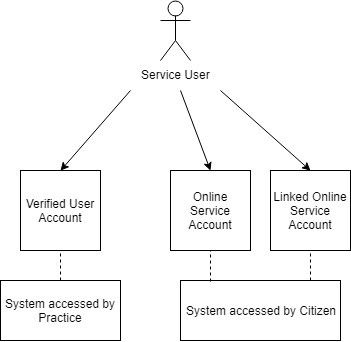
A Citizen (who need not be a registered Patient) can have three types of accounts:
| Type | Description |
|---|---|
| Verified User Account (VUA) | Previously known as a Registered Online Service User (ROSU). A verified user account is the Practice based account for a Citizen who can be a registered Patient or a person acting as a proxy for a Patient. It is created by the Patient Information Maintenance - GP Solution which holds the record, this holds details such as the identity verification record and preferences. |
| Online Service Account (OSA) | Previously known as an Online Service User (OSU). An Online Service Account is an online account created on any other service which must integrate with the Patient Information Maintenance - GP Solution to enable online access to information and services, e.g. a third-party Appointment booking application. A Citizen with an OSA account can access limited Services (e.g. limited amount of Appointment Bookings). |
| Linked Online Service Account (LOSA) | A linked Online Service Account is an OSA which has been linked to a specific VUA to enable access to Citizen Services (e.g. View Record). The credentials to link the OSA to a specific VUA will be provided by the Practice. |
From these definitions we can see that a Patient can hold multiple types of accounts simultaneously, e.g. a VUA at their registered Practice, an OSA with an Appointment Booking application and a LOSA linked to a VUA different from their registered Practice allowing access to another Patient's Record. This is why the old terminology of OSU/ROSU has been removed - a Citizen is not necessarily either a ROSU or an OSU exclusively. It is more accurate, and requirements are more understandable, to relate what service access is being required to the type of account being used to access it.
Account Structure and Relationships
.jpg?version=1&modificationDate=1542642303881&cacheVersion=1&api=v2&width=396&height=250)
A Verified User Account consists of a user name (which is associated with the Suppliers' internal ID for the Patient at a specific Practice), password and Account Linkage Key.
An Online Service Account consists of only a user name and password, which may be different to the credentials of both the VUA and any other OSA/LOSA accounts held by the Citizen.
A Linked Online Service Account differs from an Online Service Account only in that it also consists of the Account Linkage Key, Practice ODS code and Supplier's Patient ID to enable the correct VUA account to be identified and linked.
Account Lifecycle
.jpg?version=1&modificationDate=1542642304246&cacheVersion=1&api=v2&width=511&height=321)
Any Citizen can create an OSA with a service which allows this, if you create an OSA as registered Patient this gives you an easy start point to access limited Citizen Services. Creating an OSA will also create an inactive VUA which will become live once identity verification has taken place and Account Linkage has been completed. This will allow access to Citizen Services available as configured by the Practice.
For further information on Identity Verification please see DCB3051 for Identity Verification and Authentication Standard for Digital Health and Care Services
Note that the authority does not limit how many VUAs may be associated with an LOSA, i.e. a Supplier could allow a service user to associate their OSA with both their own VUA and one for whom they're acting as a proxy so that they can manage both themselves and another Patient through a single login (see proxy service access below).
Online Accounts and Proxy Service Access
In some circumstances Citizens can be granted access to Citizen services on behalf of another Patient i.e. as their proxy. For example, as a parent booking Appointments for a Child. The way that service account structures are created to support this can vary depending on the location of the records involved and also the Suppliers' Solution architecture:
| Scenario | Outcome |
|---|---|
Either:
| Proxy must go through identity verification with the Practice that holds the target Patient record (they will need to do this even if they have completed identity verification at their registered Practice). Account Linkage will need to be completed by the Proxy. This will allow linkage of their VUA at the Patient's Practice with the Patient Record the Proxy needs to view. |
Either:
| Supplier associates the proxy's VUA with both their own and the target Patient's Patient Record, creating a unique Linkage Key for each association. In scenario 2 the target Patient's Practice may require the proxy to verify their identity before allowing the association to be created. For further information on Identity Verification please see DCB3051 for Identity Verification and Authentication Standard for Digital Health and Care Services |
Citizens will be able to access all enabled Citizen Services functionality as well as manage account details for any Patients with whom they have a VUA-Patient Association of type 'Proxy'. For further information on proxy access see proxy access guidance for General Practice.
A Citizen will be able to access Citizen Services for more than one Patient where required and receive notifications (e.g. around updates to Service Access and verification of Contact Details). Citizens will also be able to request to make changes to demographic information (either for themselves or for Patients that they are acting on behalf of).
Requirements
| Requirement ID | Requirement Text | Level |
|---|---|---|
| GP-SPFS-5.2-01 | Citizen Services Definition - Service - Patient Allow the Patient to access the Practice enabled Citizen Services as configured by the Practice i.e. the Practice(s) holding the VUA (Verified User Account), including:
Allow a Patient with an OSA (Online Service Account) to only access the Limited Services – Appointments for OSA, as configured by the Practice i.e. the Practice holding the VUA. See the Patient Information Maintenance - GP Capability for more information on access levels. | MUST |
CA01 | Citizen Services Definition - Service - Proxy Allow the Proxy to access the Practice enabled Citizen Services as configured by the Practice i.e. the Practice(s) holding the VUA (Verified User Account), including:
See the Patient Information Maintenance - GP Capability for more information on access levels. | MAY |
GP-SPFS-3.1-04 | Configuration – VUA Transparency - Patient Citizen Services to support transparency of Citizen Service registration and management. The Patient is able to view all relevant information regarding:
Relevant information to be shown:
| MUST |
CA02 | Configuration – VUA Transparency - Proxy Citizen Services to support transparency of Citizen Service registration and management. The Proxy is able to view all relevant information regarding:
Relevant information to be shown:
| MAY |
| GP-SPFS-3.1-05 | Citizen Services Usage Transparency - Patient Citizen Services to support full transparency of Citizen Services Usage by displaying information including:
Previous usage to only display to Patients once the VUA-Patient Association has been established | MUST |
| CA03 | Citizen Services Usage Transparency - Proxy Citizen Services to support full transparency of Citizen Services Usage by displaying information including:
Previous usage to only display to Proxies once the VUA-Patient Association has been established Where there are multiple Proxies, usage information for all Proxies to be transparent between each Proxy. Such transparency is in relation to Citizen Services Usage regarding mutually associated Patient Record(s) only. | MAY |
| GP-SPFS-3.1-06 | Contact Details Verification - Patient Verification to be initiated by Citizen Services Solution when contact details are recorded via this Solution, notifying the Patient of successful verification. Contact Details that require validation/verification include:
See E00201 in the Patient Information Maintenance - GP Capability for further information | MUST |
| CA04 | Contact Details Verification - Proxy Verification to be initiated by Citizen Services Solution when contact details are recorded via this Solution, notifying the Proxy of successful verification. Contact Details that require validation/verification include:
See E00201 in the Patient Information Maintenance - GP Capability for further information | MAY |
| GP-SPFS-3.1-06A | Contact Details Validation - Patient Validate the format/structure of any Contact Details that a Patient is amending e.g. mobile phone number will not include letters or special characters, email address will include an @. | MUST |
| CA05 | Contact Details Validation - Proxy Validate the format/structure of any Contact Details that a Proxy is amending e.g. mobile phone number will not include letters or special characters, email address will include an @. | MAY |
| GP-SPFS-3.1-09 | System Configuration – Transparency of Audit Trail Information - Patient Aside from the requirements detailed in GP-SPFS-3.1-04 - The Patient can view current/historic Audit Trail information e.g. Citizen Services registration and Management Information | MUST |
| CA06 | System Configuration – Transparency of Audit Trail Information - Proxy Aside from the requirements detailed in GP-SPFS-3.1-04 - The Proxy can view current/historic Audit Trail information e.g. Citizen Services registration and Management Information | MAY |
| GP-SPFS-4.1-01A | Citizen Services Account Creation - Patient Allow a Patient to:
All Citizen Services Account Credentials to be created/assigned as per Authentication standards. | MUST |
| CA07 | Citizen Services Account Creation - Proxy Allow a Proxy to:
All Citizen Services Account Credentials to be created/assigned as per Authentication standards. | MAY |
| GP-SPFS-4.1-02A | Citizen Services Account Linkage - Patient Establish a connection between an Online Service Account (OSA) and a Verified User Account (VUA) Account in the Patient Information Maintenance - GP (PIM) Solution. Allow the Patient to enter VUA Credentials and Demographics. Confirm, in conjunction with the Patient Information Maintenance - GP (PIM) Solution, that information provided is a successful match. Where Account Linkage is successful, the Patient to be informed of the successful linkage. Once an Online Service Account has been linked to a VUA this then becomes a Linked Online Service Account (LOSA). Where Account Linkage is attempted but is unsuccessful:
Any Account Linkage that exists between a Citizen Services Account and an ‘Inactive’ VUA, a ‘Live’ VUA with regards to an ‘Inactive’ VUA-Patient Association (e.g. the Legal Basis for the association is yet to be established/recorded) will result in that individual having limited access as per the Online Service Account (OSA) for that Patient The implementation of some aspects of such a requirement will need to be addressed between Suppliers during Pairing Integration i.e. PIM Solution can request the additional information required to confirm a match and enable Account Linkage between VUA and Citizen Services. For VUA credentials reminder see: GP-SPFS-5.3-06 For password management see GP-IG-2.2-3 | MUST |
| CA08 | Citizen Services Account Linkage - Proxy Establish a connection between an Online Service Account (OSA) and a Verified User Account (VUA) Account in the Patient Information Maintenance - GP (PIM) Solution. Allow the Proxy to enter VUA Credentials and Demographics. Confirm, in conjunction with the Patient Information Maintenance - GP (PIM) Solution, that information provided is a successful match. Where Account Linkage is successful, the Proxy to be informed of the successful linkage. Once an Online Service Account has been linked to a VUA this then becomes a Linked Online Service Account (LOSA). Where Account Linkage is attempted but is unsuccessful:
Any Account Linkage that exists between a Citizen Services Account and an ‘Inactive’ VUA, a ‘Live’ VUA with regards to an ‘Inactive’ VUA-Patient Association (e.g. the Legal Basis for the association is yet to be established/recorded) will result in that individual having limited access as per the Online Service Account (OSA) for that Patient The implementation of some aspects of such a requirement will need to be addressed between Suppliers during Pairing Integration i.e. PIM Solution can request the additional information required to confirm a match and enable Account Linkage between VUA and Citizen Services. Account Linkage can occur between a Citizen Services Account and multiple VUAs e.g. if an individual has a VUA-Patient Association of Type ‘Self’ at one Practice and also a VUA-Patient Association of Type ‘Proxy’ for a Patient registered at a different Practice. For VUA credentials reminder see: GP-SPFS-5.3-06 For password management see GP-IG-2.2-3 | MAY |
| CA09 | Patient Selection - Proxy Allow the Proxy to select the Patient with whom they have a VUA-Patient Association with, this will allow the Proxy to undertake activities for the Patient via Citizen Services. The Patient selected will be clearly displayed throughout the activities. | MAY |
| GP-SPFS-5.1-02A | Switch Patient Proxies to have the ability to switch Patients within the session without the need to re-authenticate (log out and back in) to Citizen Services. | MAY |
| GP-SPFS-5.1-04 | Welcome Message/Practice Information Display Display a page with a welcome message/information when logging into Citizen Services. See E00202 in the Patient Information Maintenance - GP Capability for defining the welcome message | MUST |
GP-SPFS-5.1-08 | Citizen Notifications - Patient Indicate to the Patient a successful action via Citizen Services for the following areas
Where unsuccessful (including system errors or Appointment conflict) alert the Patient, with the ability to choose to either directly reattempt the action or abandon the activity. | MUST |
CA10 | Citizen Notifications - Proxy Indicate to the Proxy a successful action via Citizen Services for the following areas
Where unsuccessful (including system errors or Appointment conflict) alert the Proxy, with the ability to choose to either directly reattempt the action or abandon the activity. | MAY |
| GP-SPFS-5.2-02 | Citizen Notification – Service Access Update - Patient Indicate to a Patient via Citizen Services where:
| MUST |
| CA11 | Citizen Notification – Service Access Update - Proxy Indicate to a Proxy via Citizen Services where:
| MAY |
| GP-SPFS-5.2.1-01 | Record Management Requests - Patient Allow the Patient to make updates to Demographics and Preferences for:
Demographics and Preferences for which updates can be made to include at least:
Detail of such requests to be provided to the Patient Information Maintenance - GP Solution to enable Practice Users to review the requested change and accept or reject all or part of the update i.e. any changes requested by a Citizen requires Practice confirmation prior to the data being updated. | MUST |
| CA12 | Record Management Requests - Proxy Allow the Proxy to make updates to Demographics and Preferences for:
Demographics and Preferences for which updates can be made to include at least:
Detail of such requests to be provided to the Patient Information Maintenance - GP Solution to enable Practice Users to review the requested change and accept or reject all or part of the update i.e. any changes requested by a Proxy requires Practice confirmation prior to the data being updated. | MAY |
| GP-SPFS-5.3-01 | Request for a new VUA-Patient Association - Patient Allow a Patient to create a VUA request by entering Patient Demographic Details (Title, Forename, Family Name, Address and date of birth) i.e. begin the VUA Creation/Registration process via Citizen Services by
or by
A proposed VUA -Patient Association to be recorded in the Patient Information Maintenance (PIM) Solution, but no assurance of the relationship has occurred; therefore, access will be limited to the OSA Appointments functionality (even if VUA Identity Verification has been previously undertaken) until Assurance of the Relationship of the VUA-Patient Association occurs. In all instances the request will not result in immediate change of Access as the Practice will need to action the request by updating the VUA within the PIM Solution (e.g. undertaking Identity Verification and establishing a Legal Basis for the Relationship). See DCB3051 for Identity Verification and Authentication Standard for Digital Health and Care Services | MUST |
| CA13 | Request for a new VUA-Patient Association - Proxy Allow a Proxy to create a VUA request for a Patient by entering Patient Demographic Details (Title, Forename, Family Name, Address and date of birth) i.e. begin the VUA Creation/Registration process via Citizen Services by
or by
A proposed VUA -Patient Association to be recorded in the Patient Information Maintenance (PIM) Solution, but no assurance of the relationship has occurred; therefore, access will be limited to the OSA Appointments functionality (even if VUA Identity Verification has been previously undertaken) until Assurance of the Relationship of the VUA-Patient Association occurs. In all instances the request will not result in immediate change of Access as the Practice will need to action the request by updating the VUA within the PIM Solution (e.g. undertaking Identity Verification and establishing a Legal Basis for the Relationship). See DCB3051 for Identity Verification and Authentication Standard for Digital Health and Care Services | MAY |
| GP-SPFS-5.3-02 | Last Access - Patient When logging in and throughout the usage of Citizen Services, indicate to the Patient of their most recent authentication (date & time) to Citizen Services. | MUST |
| CA14 | Last Access - Proxy When logging in and throughout the usage of Citizen Services, indicate to the Proxy of their most recent authentication (date & time) to Citizen Services. | MAY |
| GP-SPFS-5.3-03 | Request for updated Service Access - Patient Allow a Patient to request to amend their Service Access for an existing VUA-Patient Association The request will not result in immediate change of Access as the Practice will need to action the request by updating the VUA within the Patient Information Maintenance Solution (e.g. undertaking Identity Verification and establishing a Legal Basis for the Service Access), unless:
or
| MUST |
| CA15 | Request for updated Service Access - Proxy Allow a Proxy to request to amend their Service Access for an existing VUA-Patient Association A Proxy will not be able to request update to Service Access details for any other Proxy. The request will not result in immediate change of Access as the Practice will need to action the request by updating the VUA within the Patient Information Maintenance Solution (e.g. undertaking Identity Verification and establishing a Legal Basis for the Service Access), unless:
| MAY |
GP-SPFS-5.3-05
| Request Notification - Patient Notify the Patient via Citizen Services of the outcome of their GP-SPFS-5.3-03 (i.e. VUA Status updates) | MUST |
CA16 | Request Notification - Proxy Notify the Proxy via Citizen Services of the outcome of their GP-SPFS-5.3-03 (i.e. VUA Status updates) | MAY |
GP-SPFS-5.3-06
| VUA Credentials Reminder - Patient Enable the Patient to be reminded of their VUA Credentials. This is to allow other Citizen Services to be used by the Patient when required (e.g. Supplier B gives functionality that is not available from Supplier A) VUA Credentials include:
VUA Credentials Reminder to only occur via Citizen Services where the VUA is ‘Live’. See E00166 in the Patient Information Maintenance - GP Capability for generating VUA Credentials within a Practice | MUST |
CA17 | VUA Credentials Reminder - Proxy Enable the Proxy to be reminded of their VUA Credentials. This is to allow other Citizen Services to be used by the Proxy when required (e.g. Supplier B gives functionality that is not available from Supplier A) VUA Credentials include:
VUA Credentials Reminder to only occur via Citizen Services where the VUA is ‘Live’. See E00166 in the Patient Information Maintenance - GP Capability for generating VUA Credentials within a Practice | MAY |
| GP-SPFS-5.3-07 | VUA Linkage Key Reset - Patient
See E00166 in the Patient Information Maintenance - GP Capability for generating VUA Credentials within a Practice See DCB3051 for Identity Verification and Authentication Standard for Digital Health and Care Services | MUST |
| CA18 | VUA Linkage Key Reset - Proxy
See E00166 in the Patient Information Maintenance - GP Capability for generating VUA Credentials within a Practice See DCB3051 for Identity Verification and Authentication Standard for Digital Health and Care Services | MAY |
| GP-SPFS-5.3-08 | Access Update Notification - Patient Indicate to the Patient within Citizen Services of any update to their Access, including where:
See GP-SPFS-5.1-08 for notifications via Citizen Services | MUST |
| CA19 | Access Update Notification - Proxy Indicate to the Proxy within Citizen Services of any update to their Access, including where:
See GP-SPFS-5.1-08 for notifications via Citizen Services | MAY |
| GP-SPFS-5.3-09 | Citizen Communication/Notification - Patient Any communication directly between Citizen Services and the Patient containing or based on information from the Patient Information Maintenance (PIM) Solution to use the Patient's Preferred Verified Contact Details (as obtained from the PIM Solution)
| MUST |
| CA20 | Citizen Communication/Notification - Proxy Any communication directly between Citizen Services and the Proxy containing or based on information from the Patient Information Maintenance (PIM) Solution to use the Proxy's Preferred Verified Contact Details (as obtained from the PIM Solution)
| MAY |
Capabilities
All supplier Solutions delivering one or more of the of the following Capabilities will need to meet this Standard:
Roadmap
Suppliers will not be assessed or assured on these Roadmap Items as part of Onboarding